Everything MyGaragio does
From the first call to the payment, and on to the next service reminder: all of a shop’s work in one app, in one subscription.
The whole shop, live
The shop board shows every car, who has it and when it was promised. A customer’s approval moves it along by itself.

In technicians’ and customers’ pockets
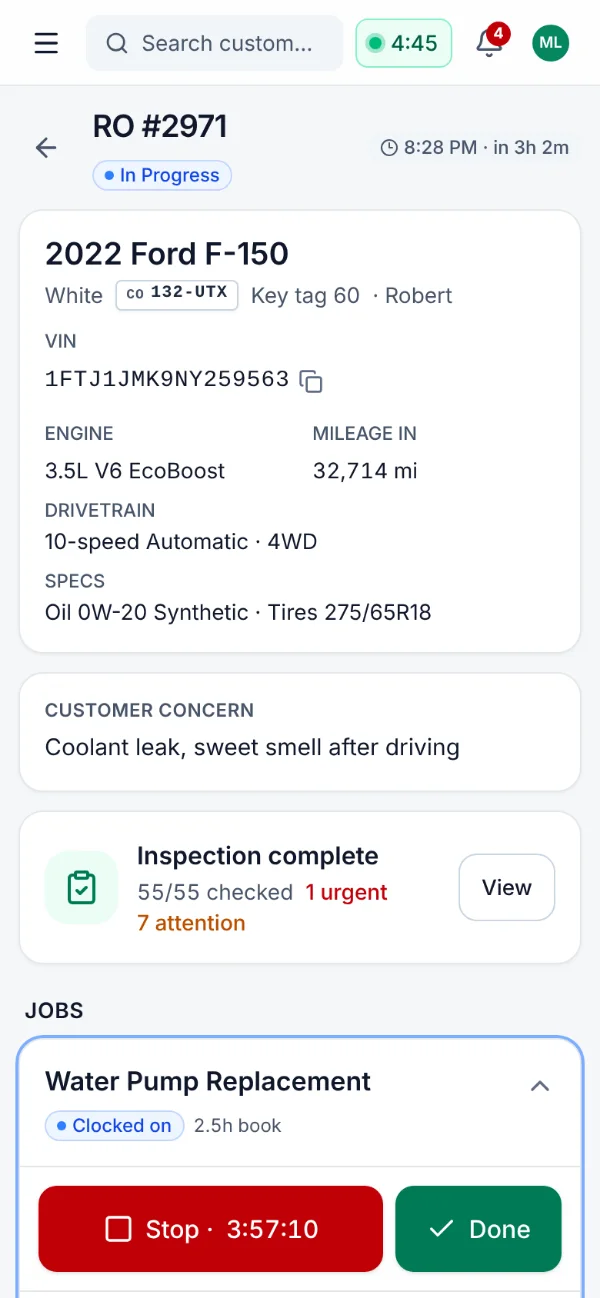
Technicians inspect and time their work on their phone, even without a signal. Customers see the photos and approve on theirs.
Digital inspections with photos
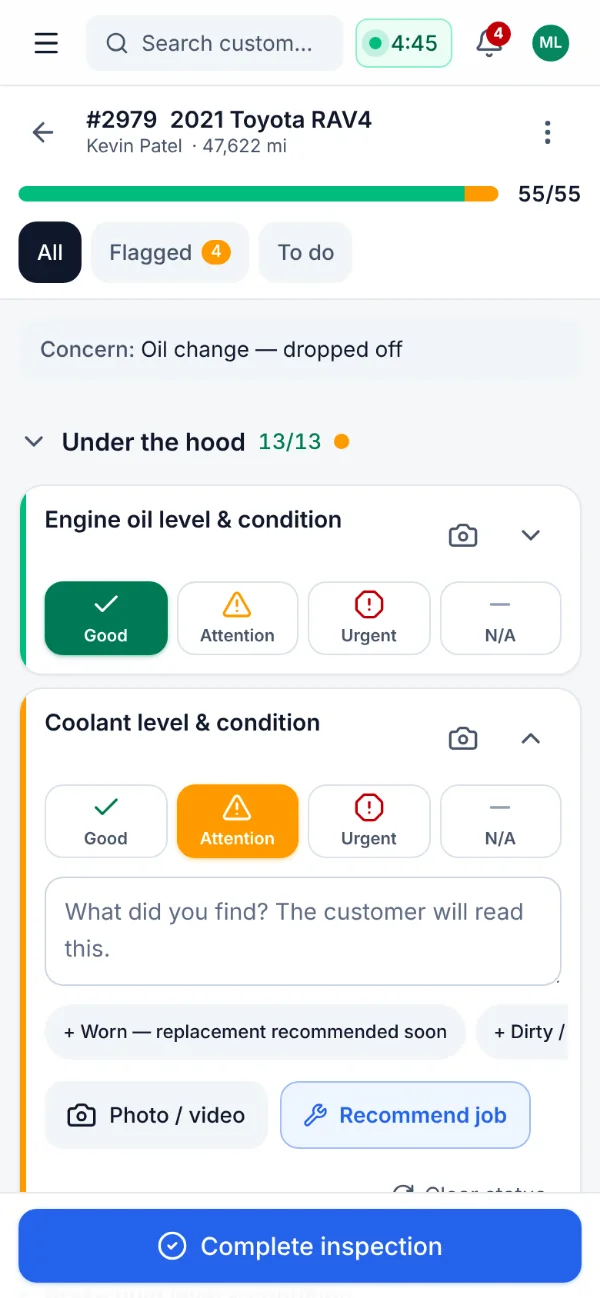
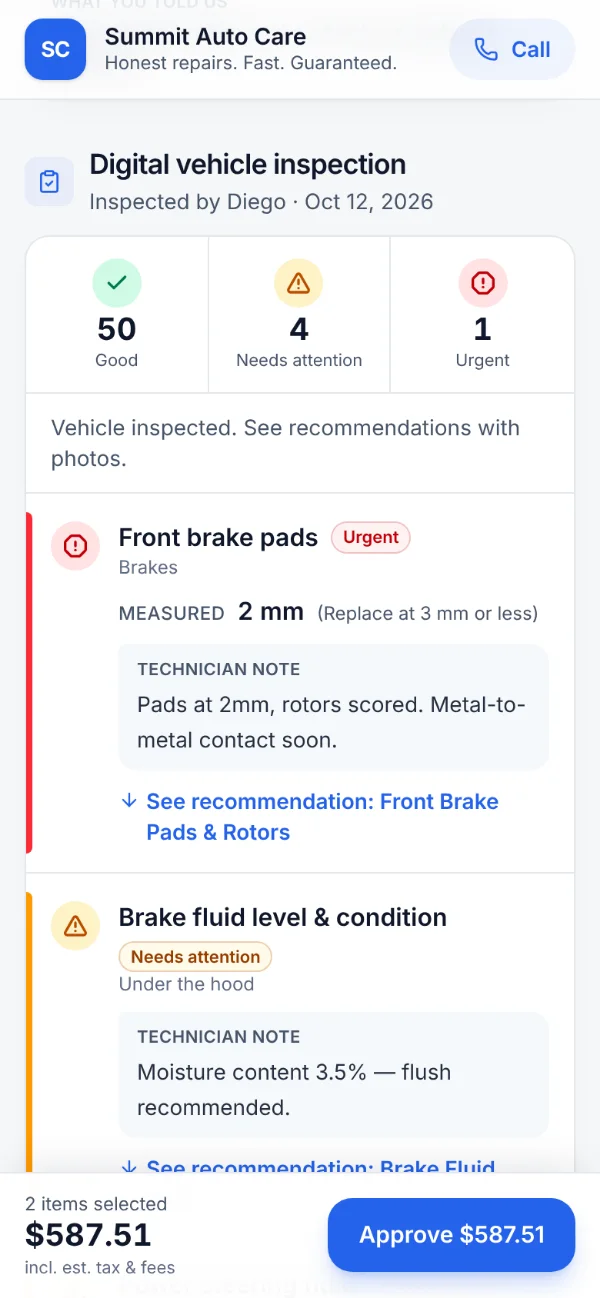
Inspections built for gloves: big buttons, quick-pick measurements, photos and video with markup — sent to the customer as a clear report.
- Big touch targets, quick-pick measurements (pad thickness, tread depth, battery health), one-tap notes and “rest good”.
- Photos and video, compressed for weak connections; mark them up with arrows, circles, pen and labels.
- Recommend a job from any item, priced from your service menu.
- A photo report the customer approves from, with a plain-language summary written for them in one tap.
- Results and photos taken in a dead spot stay on the phone and sync on their own when the signal returns.
Customer approvals by text
Text or email the estimate. The customer opens it on their phone, sees the photos, approves job by job and signs.
- Approve or “not now” per job, live totals and an e-signature, all recorded with the method and time.
- Good / better / best options: the customer picks one, and the others never count as declined work.
- Pay online by card from the same link.
- An approval moves the car to the next stage on the shop board by itself.
- Declined work is kept on the vehicle and followed up later.
- In the customer’s language: English, French, Spanish, German or Portuguese.
Live shop board
Every car on the lot on one live board — who has it, where it is, and when it was promised.
- Drag cars between stages or technicians.
- Promise-time countdowns, waiter and rush flags.
- A TV mode for the shop floor.
- Every open screen refreshes within a second of a change on any device.
Scheduling and online booking
A calendar that knows your capacity, and a booking page that only offers the slots you can really take.
- Day (by technician or bay), week, month and agenda views; drag to move, resize or create, with Undo.
- Booked against available hours each day, from the hours your team actually works (schedules and time off).
- Block time for lunch, training or a lift that’s down.
- Online booking with real availability: drop off, wait, or pickup and delivery.
- Confirmations and reminders by text or email; customers reply C to confirm or R to reschedule.
- One click turns an appointment into a repair order.
Estimates and repair orders
Fast, accurate estimates priced by your own rules, with live profit on every repair order.
- Jobs with labor, parts, tires, sublet and fees; your parts matrix and labor rates applied automatically.
- Quote a custom job in seconds from the jobs your shop has already done.
- Live profit, gross-profit percentage and effective labor rate on every repair order.
- Printable estimate, work order and invoice in the customer’s language.
- Check-in walkaround, open safety recalls and possible warranty returns flagged on the repair order.
Parts ordering: PartsTech, eBay, Car-Part.com
Find and order parts from the job, and they land on the repair order at your prices.
- PartsTech: open your cart with the repair order’s vehicle, bring it back onto the job, then order and track it on a purchase order.
- Search eBay for new and used parts without leaving the job.
- Car-Part.com: open a recycled-parts search on the right vehicle.
- Import any supplier’s cart or quote: paste the rows, drop a CSV, or snap a screenshot.
- Parts are priced by your matrix and marked as ordered from that supplier.
Inventory and purchase orders
Know what’s on the shelf, what’s reserved, what’s on order — and what you’re owed for cores and returns.
- Parts and tires with reorder points, reservations by open repair orders and average cost.
- Barcode scanning with the camera or a USB scanner, and cycle counts.
- Purchase orders with partial receiving; send a PO to the vendor by email with a CSV of the lines.
- A parts board: needed, ordered, received.
- Returns and cores tracked until the credit memo arrives.
Automations and personalized messages
Bring customers back with messages about their own car, not generic blasts.
- Appointment reminders, review requests, service reminders, declined-work follow-ups, campaigns and birthday greetings, sent within quiet hours.
- One message per customer about their own car: services due, measured brake and tire wear, the seasonal tire changeover and work they declined — with your prices and a booking link.
- Churn risk: who is drifting away, the yearly revenue at stake, and a one-tap win-back message.
- A two-way texting and email inbox; text from your Twilio number or your shop’s own Android phone.
- Reviews dashboard, memberships and an eight-week forecast that tells you who to call to fill a slow week.
AI assistant and receptionists, included
Answers from your shop’s data, writing help, and receptionists that answer texts and calls when nobody can.
- Ask the shop anything — “how did we do last week?” — answered from live data, within each person’s permissions.
- Writing help: customer-friendly job explanations, technician stories, inspection summaries and suggested replies.
- Read a VIN from a photo of the door sticker, or a supplier’s quote from a screenshot.
- Text receptionist: instant answers to customer texts from your own data — car status, hours, prices, booking link.
- Voice receptionist on your Twilio line: answers when nobody picks up, in French or English, and texts the caller the right link.
- Included in the subscription with a monthly allowance; an owner can turn AI features off.
Reports and shop health check
The numbers that matter, and a plain next step for each one.
- Dashboard: sales, car count, average repair order, gross profit, close ratio, effective labor rate and receivables, against your goals.
- “Money left on the table”: declined safety work, estimates waiting on the customer, parts sold under your matrix, missed calls nobody returned.
- 18 reports with CSV export and print layouts: sales, profitability, payroll, technician productivity, receivables aging, sales tax, end of day, P&L.
- Shop health check: the last 90 days graded against independent-shop benchmarks, with what reaching each one is worth.
QuickBooks Online sync
Invoices and payments reach your books by themselves, to the cent.
- Invoiced repair orders go over as invoices, payments as payments, and voids void them, minutes after they happen.
- Totals match to the cent, each amount on the QuickBooks item you choose.
- Anything QuickBooks refuses waits in a “Needs attention” list with Retry; nothing is sent twice.
- Exports for QuickBooks Desktop (IIF) and a balanced general journal for Sage 50, Acomba or Xero, with each tax on its own account.
Card readers and online payments
Get paid at the counter or from the customer’s phone, and the payment records itself.
- Send a balance to a Stripe smart reader at the counter; the customer taps, inserts or swipes.
- Customers pay online from their estimate or invoice link.
- Cash, card, cheque, financing, gift cards, deposits, split payments and refunds — plus Interac debit and e-Transfer.
- Store credit, and warranty or insurance claims billed to the third party.
- A daily close with a cash-drawer counter.
More than one location
Link your shops: compare them, share customers and parts, keep prices in step.
- Sales, car count, average repair order, margin, hours and close rate side by side, with totals.
- Find a customer at another location and bring them over with their vehicles and history.
- See a sister shop’s stock and transfer a part onto your shelf.
- Copy the service menu, labor rates, parts matrix and fees from one location to another, after reviewing what changes.
Technician app that works offline
Everything a technician needs on a phone or tablet — even at the back of the lot with no signal.
- My jobs, job timers, cause and correction notes, voice notes and parts requests.
- No signal? Timer taps, notes, inspection results, photos and tire DOT numbers are kept on the phone and sent when it returns — with the time of the tap.
- Technicians never see your costs, and see prices only if you allow it.
- English, French or Spanish, per technician.
- Installs on the home screen of a phone or tablet.
Built for Canada and Quebec
Separate GST, QST, HST and PST lines, bilingual documents and the Quebec Consumer Protection Act rules, built in.
- Pick your province: its taxes as separate lines (GST + QST, HST, or GST + PST), CAD, kilometres and its time zone.
- Each tax rounded on its own, with your GST/HST and QST registration numbers on every invoice.
- French, English or both: estimates, invoices, approval pages, texts and emails in each customer’s language; bilingual documents print French first.
- Quebec Consumer Protection Act: written estimates above $100, part condition, hours × rate, and a 3-month / 5,000 km default warranty.
- The whole app in Canadian French for the staff who prefer it.
- Interac payments, Canadian postal codes, and your data hosted in Canada.
Switch without losing your history
Drop the files your old system exports. Customers, vehicles, history and parts come over in one go.
- CSV, Excel or JSON, any column names, in English or French — drop every file at once.
- MyGaragio recognizes what each file holds and maps the columns; you check and adjust before importing.
- Past visits become paid repair orders, so service reminders, wear forecasts and history work from day one.
- Export guides on our website for Tekmetric, Shopmonkey, Mitchell 1, Protractor, GEM-CAR and Garage Partner Pro: which reports to export and what comes over.
- Running the same files again adds nothing twice, and Undo removes an import.
Try MyGaragio in your shop
Thirty days free, every feature, no credit card. Bring your data from the system you use today.